IT Consultant

Networks, Cameras, Door Access and Phones for Coachella Valley Businesses

Your Business, Fully Connected.

I design, install and support Ubiquiti UniFi systems for businesses in the Coachella Valley: the network, the Wi-Fi, the cameras, the door readers and the phones. One system, one app, one person to call.

  • Ubiquiti-certified UniFi Network Specialist
  • Based in Indio, CA
  • English y Español
  • Written quote before any work
Example 10U wall rack: UniFi Dream Machine Pro Max gateway, brush panel, 24-port patch panel with short patch cables to a UniFi Pro Max 24 PoE switch, brush panel, UNVR camera recorder, and a 2U battery backup. 1 2 3 4 5 6 7 8 9 10 UDM Pro MaxGateway Patch panelCat6, 24 ports 1 5 9 13 17 21 USW Pro Max 24 PoESwitch UNVRProtect recorder UPSBattery backup
An organized rack. Short patch cables, every port numbered, battery backup at the bottom. PoE deviceData only

What I Install and Support

Every job falls under three promises. Most of the equipment is Ubiquiti UniFi, so it all shows up in one dashboard.

ConnectedNetwork and Phones

  • Network InstallationUniFi gateway, switches and firewall rules set up for your office.
  • Wi-Fi CoverageUniFi access points placed from a site walk, with separate guest Wi-Fi.
  • Structured CablingCat6 runs, patch panels, every cable labeled at both ends.
  • VoIP Phone SystemsUniFi Talk desk phones, auto-attendant and call routing.
  • Web ManagementDomain, DNS and website upkeep.
SecureCameras and Doors

  • Surveillance CamerasUniFi Protect cameras with local recording. No monthly cloud fee.
  • Door Access ControlUniFi Access readers. Cards, phone unlock and schedules per employee.
  • Windows AdministrationUser accounts, updates, backups and permissions.

OrganizedRacks and Support

  • Server-Room OrganizationRack layout, cable management and a clean, labeled closet.
  • Printer ConfigurationNetwork printers and scanners that work from every computer.
  • Ongoing IT SupportRemote and on-site help when something stops working.

A Typical UniFi System

This is what I install in most offices. Every box below is Ubiquiti equipment, and every one of them shows up in the same UniFi app.

Typical UniFi install: internet to a UDM Pro Max gateway, managed from the UniFi app, feeding a USW Pro Max 24 PoE switch that powers U7 Pro access points, G5 cameras, a UNVR recorder, G2 Pro door readers and Talk Touch phones. remote Internet UDM Pro Max Gateway and firewall UniFi app Phone or browser USW Pro Max 24 PoE Powers every device below U7 ProWi-Fi 7 access points G5 camerasUniFi Protect UNVRRecords video on site G2 Pro readersUniFi Access doors Talk TouchUniFi Talk phones
  1. Internet
  2. UDM Pro MaxGateway and firewall. Managed from the UniFi app on your phone.
  3. USW Pro Max 24 PoESwitch that powers every device below
  4. U7 ProWi-Fi 7 access points
  5. G5 camerasUniFi Protect
  6. UNVRRecords video on site
  7. G2 Pro readersUniFi Access doors
  8. Talk TouchUniFi Talk phones
One Cable per Device

The PoE switch powers cameras, access points, readers and phones. No new outlets.

Video Stays in Your Building

Cameras record to the UNVR on site. No per-camera cloud fees.

Sized to Your Office

Model numbers change with the job. These are examples, not a fixed package.

Everything in the UniFi App

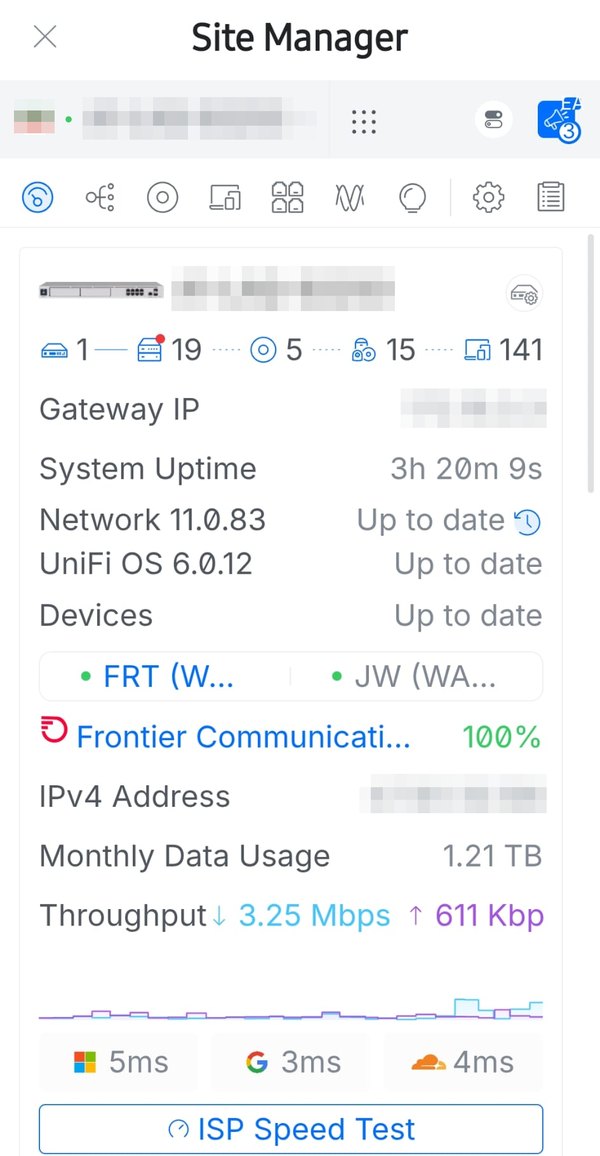
After the install you get your own login. These screens are from my phone, at sites I support. Client names and addresses are blurred.

UniFi Site Manager on a phone: gateway status, 141 clients, internet provider at 100%, latency to Microsoft, Google and Cloudflare.
NetworkInternet status, connected devices, data use and response times, at a glance.
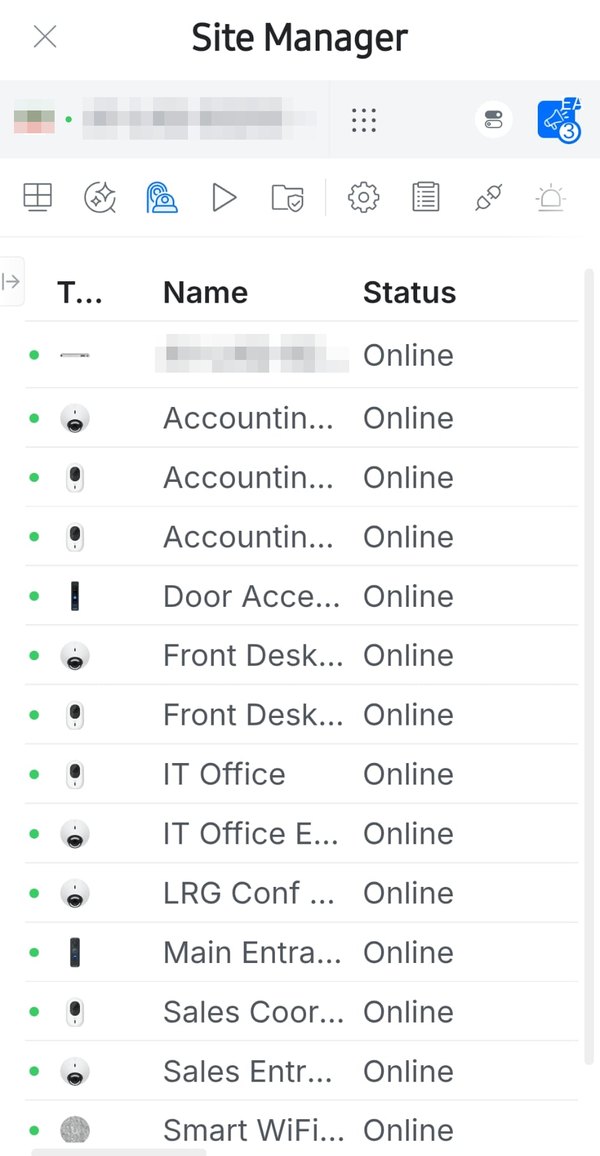
UniFi Protect device list: cameras and door readers named by location, all online.
ProtectEvery camera and door reader, named by where it is, with its status.
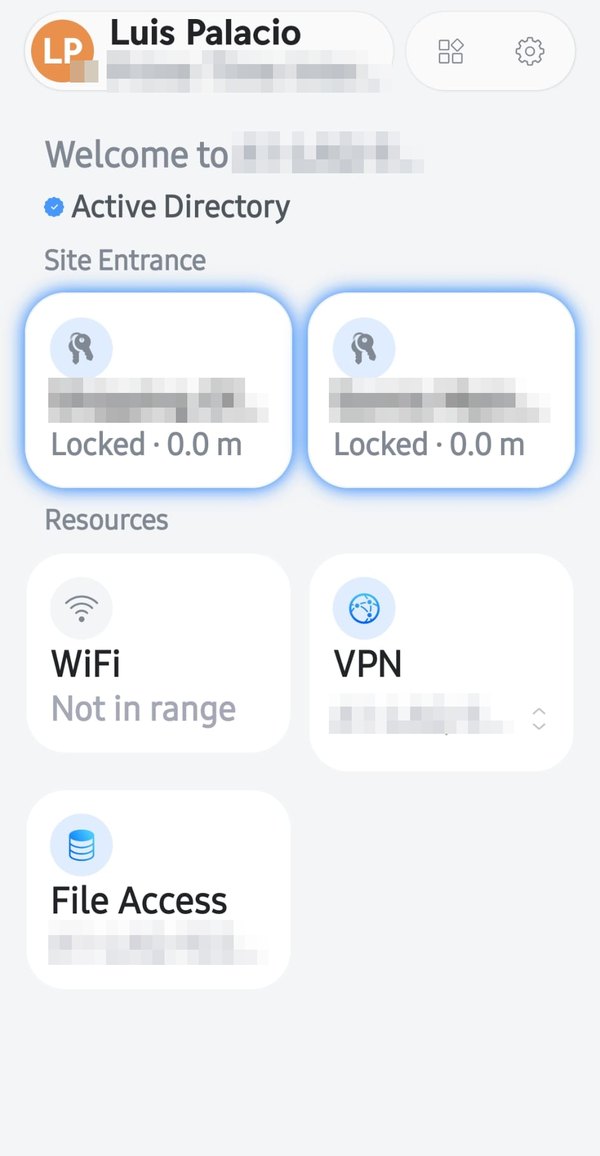
UniFi Endpoint app: two site doors, Wi-Fi, VPN and file access for a signed-in employee.
Your Phone Is the KeyUniFi Endpoint lets staff unlock doors, join Wi-Fi and VPN, and reach shared files.
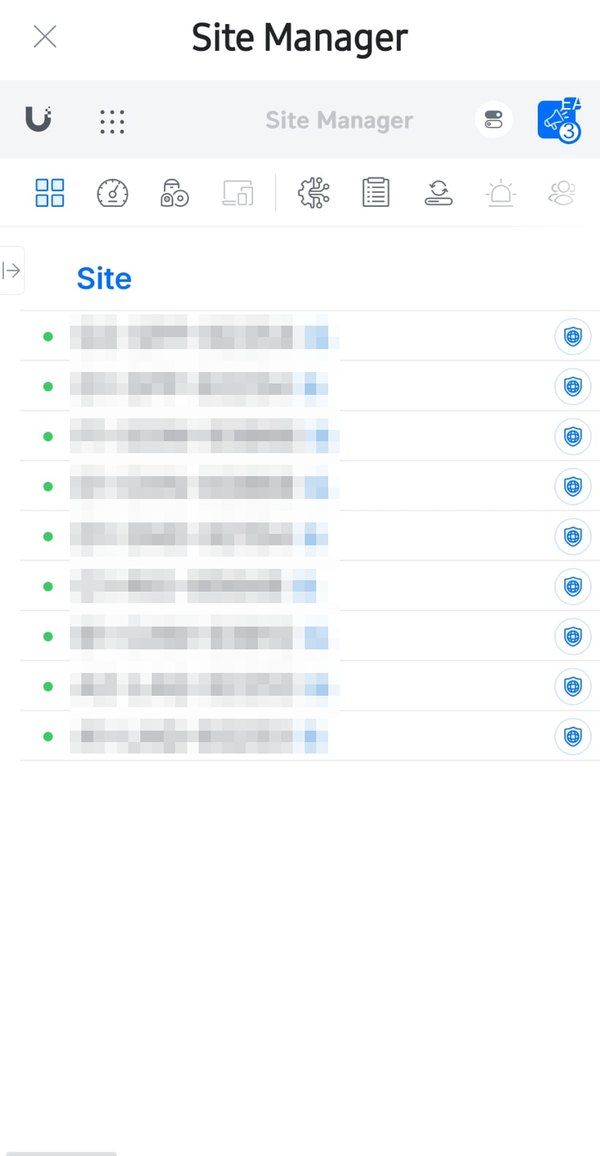
UniFi Site Manager list of nine sites, all online.
Every Site in One ListAll the locations I support, in one app. Green means online.
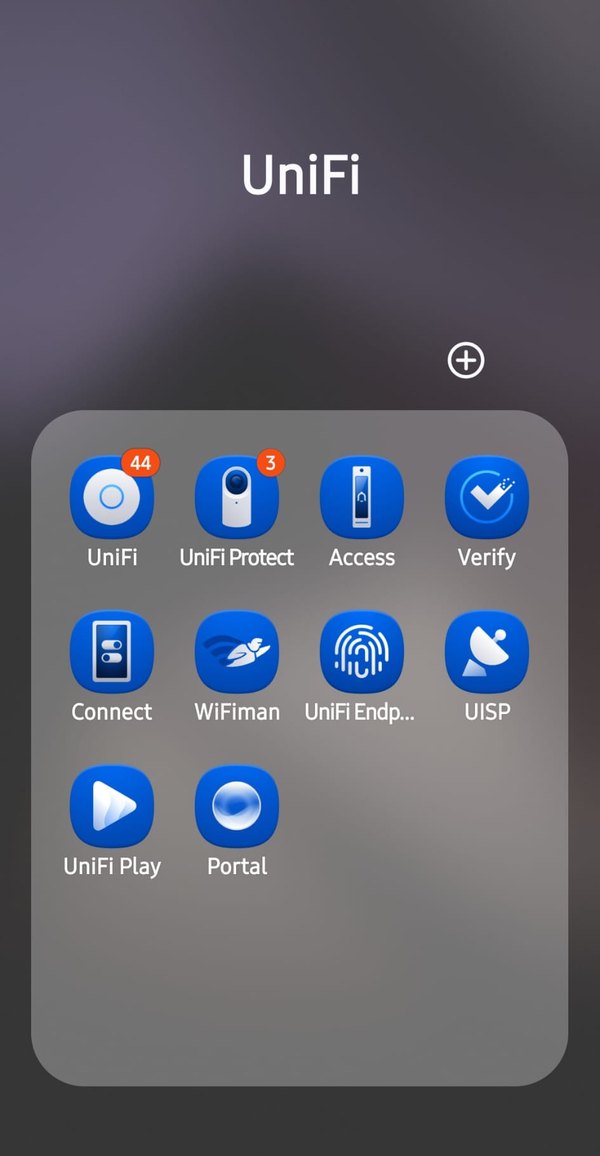
Phone folder of UniFi apps: UniFi, Protect, Access, Verify, Connect, WiFiman, Endpoint, UISP, Play and Portal.
One Family of AppsNetwork, cameras, doors, displays and more. One Ubiquiti account signs in to all of them.

Why I Build on Ubiquiti UniFi

I am a Ubiquiti-certified UniFi Network Specialist, trained through Ubiquiti Academy. I use UniFi because it lets a small business run enterprise-grade equipment without enterprise licensing. Network, cameras, doors and phones live in one system, managed from one app.

  • One App for EverythingSee cameras, unlock a door or check who is on the Wi-Fi from your phone.
  • No Per-Device SubscriptionsYou buy the equipment once. Camera video records to a local drive in your building.
  • Grows with YouAdd an access point, a camera or a door later. It joins the same system.
  • Remote SupportWith your permission I can check and fix most problems without a trip.

How a Job Runs

Same four steps on every job, from one access point to a full building.

  1. Site Walk

    I visit, look at the space and the current setup, and listen to what is not working.

  2. Written Quote

    Equipment list, labor and timeline on one page. Nothing starts until you approve it.

  3. Install and Test

    Cabling, mounting and setup. Every cable labeled, every port tested.

  4. Hand-Off and Support

    I walk you through the app and leave the documentation. Then I am a call away.

What You Get at the End

Every install closes with a hand-off sheet. You know what was installed, where it is and how to reach it.

Hand-Off Sheet Sample
Cable Test
Every run tested and logged, port by port
Labels
Both ends of each cable, matched to the patch panel
Network Map
Where each switch, access point and camera is
Owner Access
Your admin account in the UniFi app, not only mine
Wi-Fi
Staff and guest network names and passwords
Support
How to reach me and what to check first

Already a Client?

Sign in to the Client Portal to see every project and job at your site: when it started, when it finished, and the documents for each one.

Open Client Portal

Service Area

Businesses across the Coachella Valley. Outside this list? Ask.

  • Indio
  • La Quinta
  • Coachella
  • Thermal
  • Indian Wells
  • Palm Desert
  • Rancho Mirage
  • Cathedral City
  • Palm Springs
  • Desert Hot Springs

Book a Site Walk

Tell me what you have and what is not working. I will reply within one business day and set a time to visit.

Hablo español. Llame o escriba en el idioma que prefiera.

Phone
Email